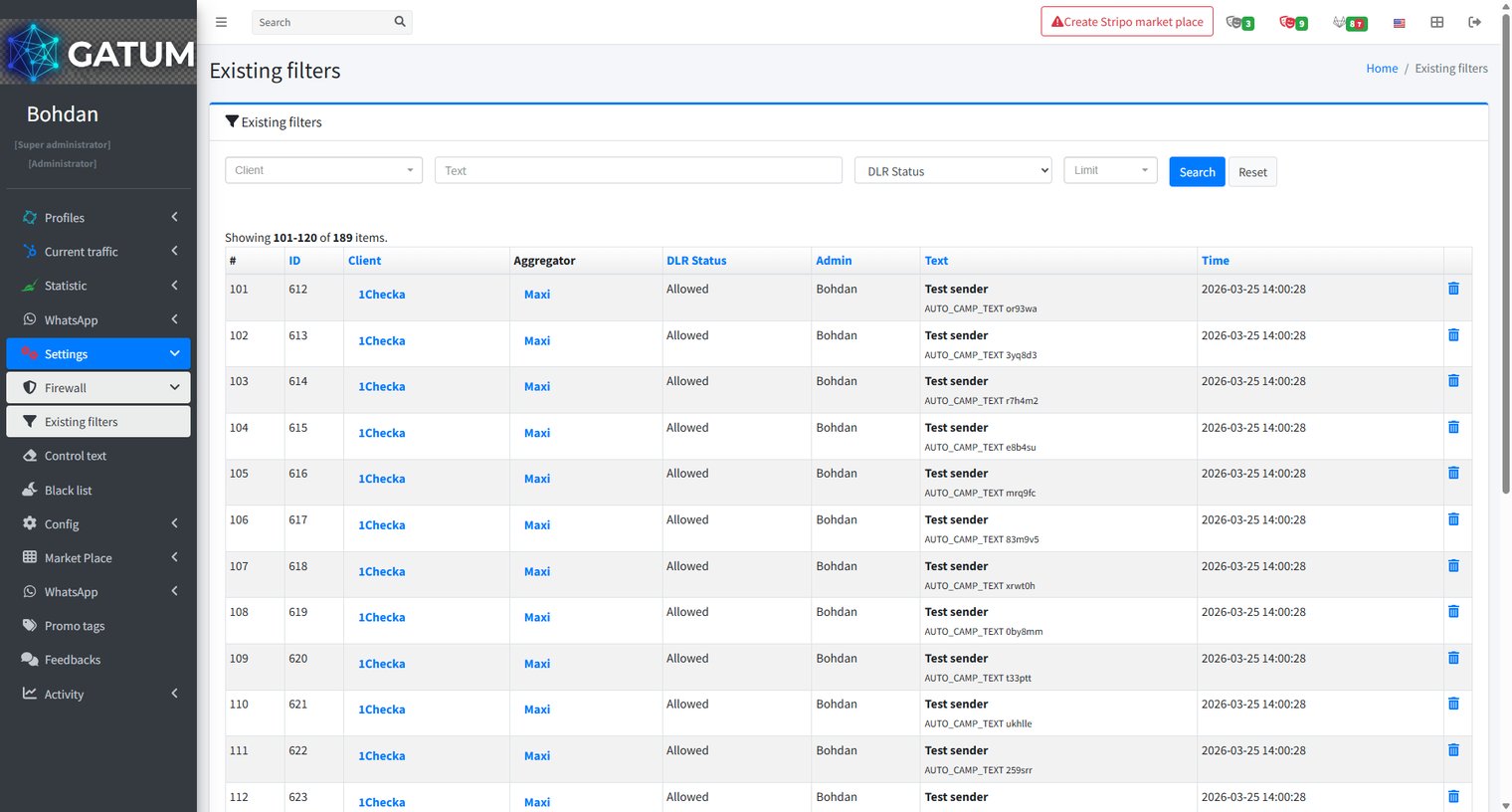
Every time you approve or reject a message during moderation, the platform saves that decision as a filter. The next time a message with similar content arrives, it is handled automatically – without going through the moderation queue again. Existing filters is where you can see and manage all of these saved decisions.
Go to Settings → Firewall → Existing filters.
Each row represents one saved decision and shows the Client, Aggregator, DLR Status, the Admin who made the decision, the Sender, the message Text, and the Time it was recorded.
The DLR Status column tells you what will happen to future messages that match this filter:
Status
What it means
Allowed
The message was approved during moderation. Future messages with the same content are sent automatically without going to the queue.
Rejected
The message was rejected during moderation. Future messages with the same content are blocked automatically.
Moderation
The message is still pending a moderation decision and has not yet created an automatic rule.
Use the filters at the top – Client, Text, and DLR Status – to search for a specific entry. To remove a saved filter and return those messages to manual review, click the delete icon in the row.
When a message is held for review instead of being sent immediately, it means it was caught by one of the platform's moderation mechanisms. Understanding why this happens helps you manage traffic more effectively and configure moderation to match your workflow.
Reason 1:...
Why do SIDs get moderated, and how to set it up?
Sender ID moderation lets you control which sender names your clients can use. When it's enabled, a client can't send SMS with a new sender until you approve it. This helps you keep traffic clean and avoid unexpected sender names going out.
Go...
Why Do SMS Get Into the Waiting List?
When there is not enough balance to send all messages in a campaign, the platform automatically moves the unsent SMS to the Waiting SMS queue instead of dropping them. Once you top up your balance, you can resend them manually.
For example, if...
Cookie declaration last updated on 01/01/2025
This website uses cookies
We use cookies to enhance your browsing experience, provide social media features, and analyze our traffic.
You consent to our cookies if you continue to use our website.