|
Field
|
Description
|
|
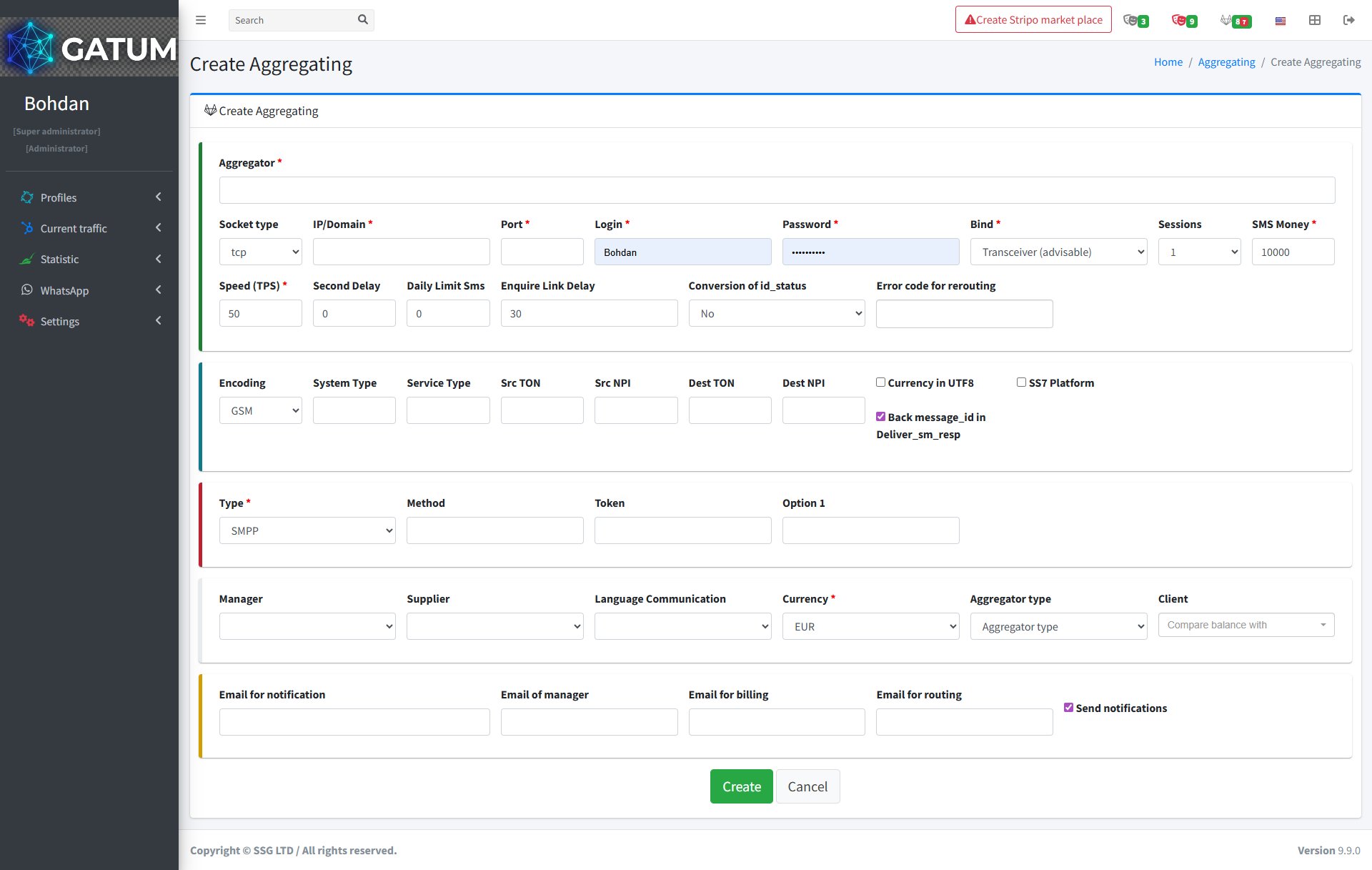
Aggregator
|
The name of the aggregator as it will appear on the platform.
|
|
Socket type (optional)
|
The socket protocol used for the connection. Leave as default unless specified by your provider.
|
|
IP/Domain
|
The IP address or domain name of the provider.
|
|
Port
|
The port used to connect to the provider.
|
|
Login
|
The login credential for the connection. Share this with your provider so they can authenticate.
|
|
Password
|
The password for the connection. Share this with your provider along with the login.
|
|
Bind
|
The SMPP bind type. Transceiver is recommended unless your provider requires otherwise.
|
|
Sessions (optional)
|
The number of simultaneous SMPP sessions allowed.
|
|
SMS Money
|
The starting balance for this aggregator. Defaults to 10000.
|
|
Speed (TPS)
|
The maximum sending speed in messages per second. Get this value from your provider.
|
|
Second Delay (optional)
|
A delay in seconds between sending attempts.
|
|
Daily Limit SMS (optional)
|
The maximum number of messages that can be sent per day through this aggregator.
|
|
Enquire Link Delay (optional)
|
The interval in seconds for SMPP keep-alive enquire_link requests. Defaults to 30.
|
|
Conversion of id_status (optional)
|
Whether to convert the message ID status format.
|
|
Error code for rerouting (optional)
|
Error codes that trigger automatic rerouting when returned by the provider.
|
|
Encoding (optional)
|
The character encoding used for messages. Defaults to GSM.
|
|
System Type (optional)
|
The SMPP system type value sent during the bind.
|
|
Service Type (optional)
|
The SMPP service type value for outgoing messages.
|
|
Src TON / Src NPI (optional)
|
Type of Number and Numbering Plan Indicator for the message sender.
|
|
Dest TON / Dest NPI (optional)
|
Type of Number and Numbering Plan Indicator for the message recipient.
|
|
Currency in UTF8 (optional)
|
Enable if the provider requires UTF-8 encoding for currency symbols.
|
|
SS7 Platform (optional)
|
Enable if the provider uses an SS7 signalling platform.
|
|
Back message_id in Deliver_sm_resp (optional)
|
Returns the original message ID in the deliver_sm response. Enabled by default.
|
|
Type
|
The connection protocol. SMPP is standard; other types are available for specific integrations.
|
|
Method (optional)
|
The HTTP method used when Type is set to HTTP.
|
|
Token (optional)
|
An authentication token, if required by the provider.
|
|
Option 1 (optional)
|
An additional provider-specific parameter.
|
|
Manager (optional)
|
The platform manager responsible for this aggregator.
|
|
Supplier (optional)
|
The supplier linked to this aggregator.
|
|
Language Communication (optional)
|
The language used for communication with this provider.
|
|
Currency
|
The currency the provider works with.
|
|
Aggregator type (optional)
|
A classification label for this aggregator.
|
|
Client (optional)
|
Associate this aggregator with a specific client for balance comparison.
|
|
Email for notification (optional)
|
Receives general notifications about this aggregator.
|
|
Email of manager (optional)
|
The manager's email for aggregator-related alerts.
|
|
Email for billing (optional)
|
Receives billing-related notifications.
|
|
Email for routing (optional)
|
Receives routing-related alerts.
|
|
Send notifications (optional)
|
Enable to activate email notifications for this aggregator.
|