How to Configure Sending Reports to the Client via SMS Sent via the API Protocol?
12.06.2026
When a client sends SMS via the API, the platform can automatically send a delivery report (DLR) to a webhook URL of their choice. This lets the client's system receive real-time status updates for every message sent.
Before You Start
The API access must be enabled for the client in the admin panel. Go to Profiles → Clients, open the client's edit page, and make sure the Can Send via API feature is enabled.
Set Up DLR Sending to Webhook
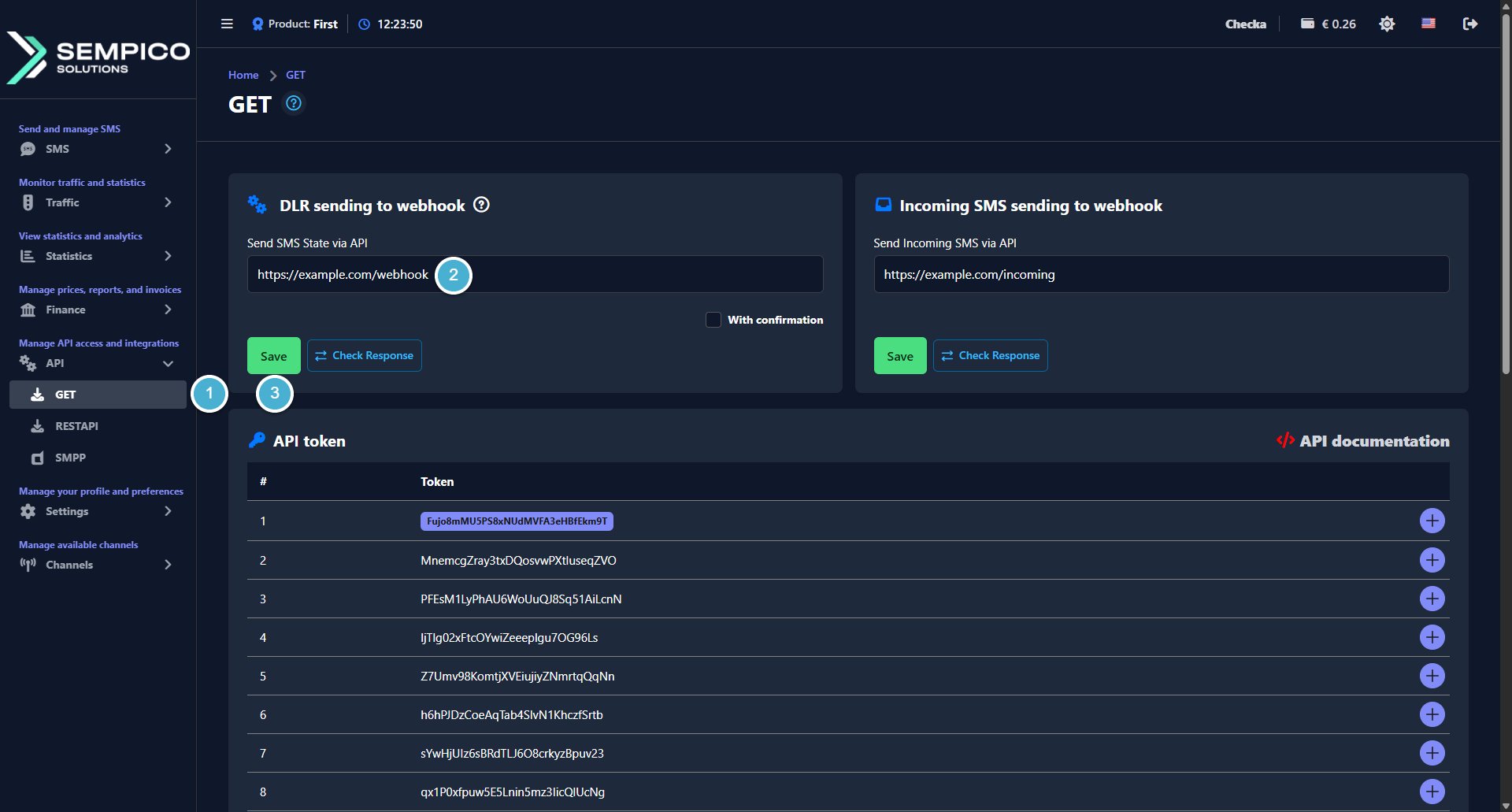
Go to API → GET.
In the DLR sending to webhook block, enter the webhook URL in the Send SMS State via API field.
This is the address where delivery reports will be sent for each SMS. The URL should be provided by the client's development team.
If you want the platform to wait for a confirmation response from the webhook before marking the delivery report as sent, enable the With confirmation checkbox.
Click Save, then click Check Response to verify that the webhook is reachable and responding correctly.
Once saved, the platform will start sending DLR reports to the specified URL for every SMS sent via API.
SMS is a simple and familiar communication channel. Most of us remember old mobile phones thatshowed a character counter while typing a message. Today, smartphones often hide this counter,but the technical limits of SMS have not disappeared.For anyone...
Sempico Solutions SMS Integration with ActiveCampaign
ActiveCampaign is a marketing and sales automation platform designed to drive revenue growth for businesses. It empowers users to create personalized marketing campaigns, automate customer follow-up, and optimize sales efficiency.
To start sending SMS marketing via Sempico...
Sempico Solutions SMS Integration with Fast Track
Sempico Solutions can be integrated with Fast Track CRM through Fast Track’s Custom SMS Solution framework.
The integration enables iGaming operators to use Sempico as an SMS delivery layer for CRM activities, lifecycle automation, player engagement campaigns,...
Cookie declaration last updated on 01/01/2025
This website uses cookies
We use cookies to enhance your browsing experience, provide social media features, and analyze our traffic.
You consent to our cookies if you continue to use our website.