Content Autoreplacement Rules for Aggregator: How to Create?
12.06.2026
Content replacement rules let you automatically modify the text of outgoing SMS messages at the aggregator level. Any traffic sent through a given aggregator – regardless of which client sent it – passes through these rules before delivery. This is useful when an aggregator has specific content requirements, or when you need to strip, replace, or transform certain words or phrases across all traffic for that connection.
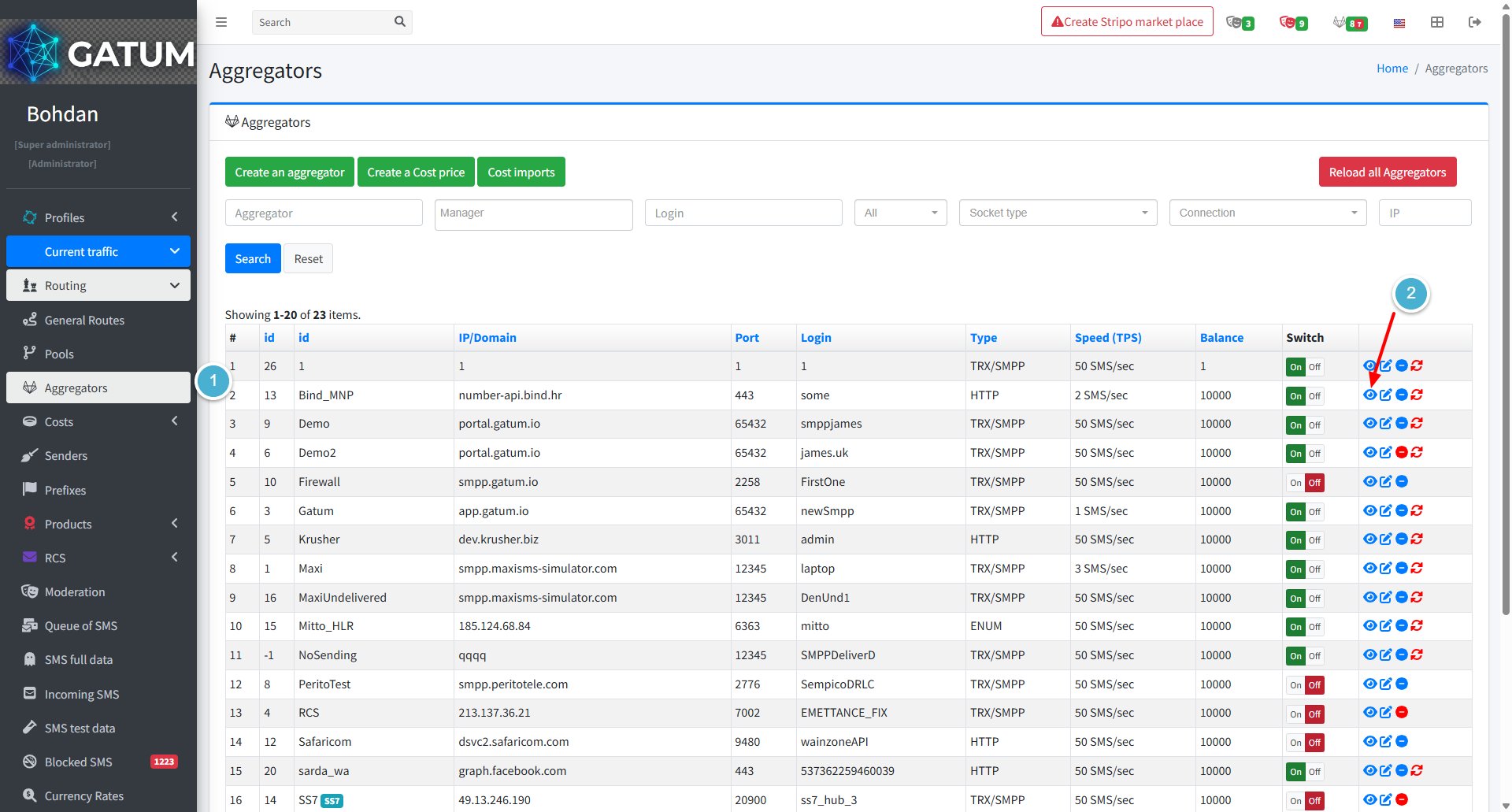
Go to Current traffic → Routing → Aggregators.
Click the eye icon next to the aggregator you want to configure.
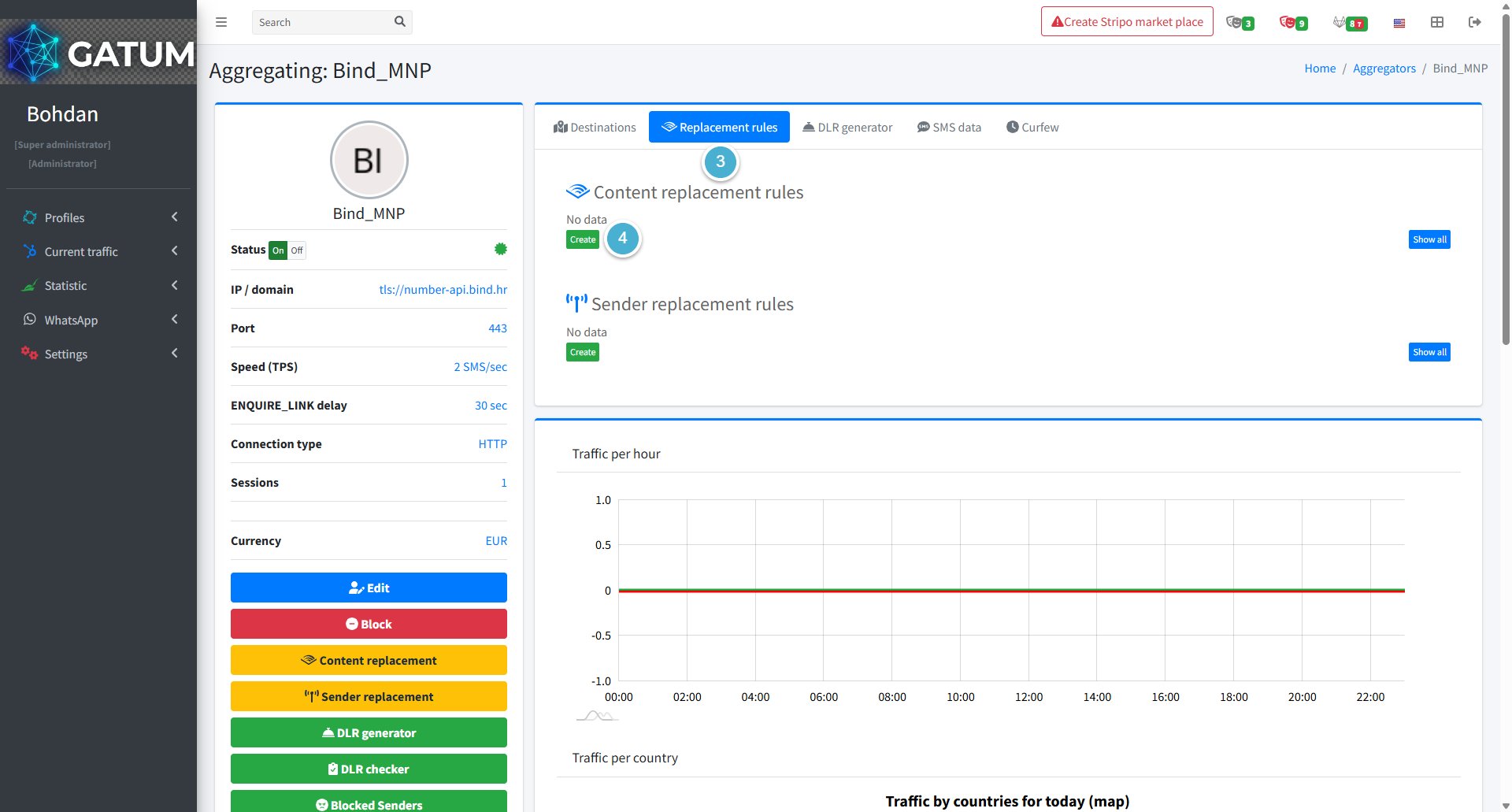
Open the Replacement rules tab.
Click Create in the Content replacement rules block.
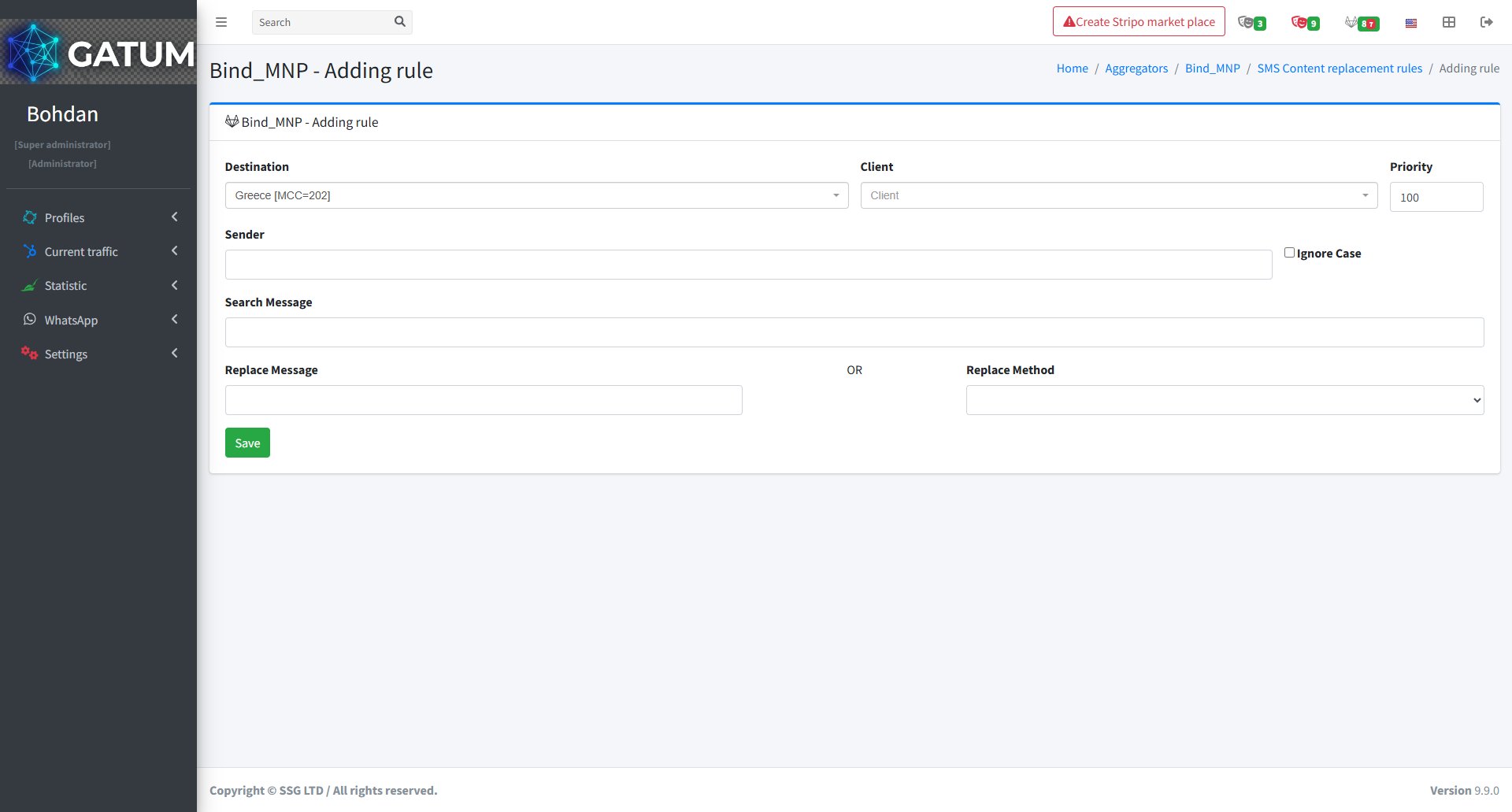
In the window that opens:
Fill in the fields:
Field
Description
Destination
The country or destination this rule applies to.
Client (optional)
Limit the rule to a specific client. If left empty, the rule applies to all clients sending through this aggregator.
Priority
The order in which rules run when multiple rules exist. Lower numbers run first – a rule with priority 1 executes before a rule with priority 100.
Sender (optional)
Apply the rule only to messages with this sender name. Leave empty to match any sender. Check Ignore Case to match regardless of letter capitalisation.
Search Message
The word or phrase to find in the SMS content.
Replace Message
The text to substitute in place of the matched phrase. Use this for straightforward text replacements.
Replace Method
A built-in macro to apply instead of a plain text substitution. See Available Replace Methods below.
Click Save.
Once saved, the rule applies to all traffic routed through this aggregator. If you configure multiple rules – for example, one to locate a value and another to reinsert it elsewhere in the message – use the Priority field to define the exact sequence they run in.
Available Replace Methods
Instead of entering a replacement phrase, you can select a built-in macro in the Replace Method field. Macros perform predefined transformations on message content and do not require a value in Replace Message unless noted.
Macro
What it does
{SAVEDIGITS}
Finds and remembers a standalone number sequence (digits surrounded by spaces or empty). Does not replace it – use together with {BEGIN} or {END} to reinsert the saved value using {DIGITS}.
{SAVEURL}
Finds and remembers a standalone URL in the message. Reinsert using {URL} in a subsequent {BEGIN} or {END} rule.
{SAVEPHONE}
Finds and remembers a phone number in the message. Reinsert using {PHONE} in a subsequent {BEGIN} or {END} rule.
{EMPTY}
Matches messages with no text content at all and replaces them with the value in Replace Message. Useful as a fallback when other rules might strip the message completely.
{BEGIN}
Inserts the value from Replace Message at the start of the message. Supports {DIGITS}, {URL}, and {PHONE} placeholders to reinsert values saved by earlier rules.
{END}
Inserts the value from Replace Message at the end of the message. Supports the same placeholders as {BEGIN}.
{TRIM}
Removes leading and trailing spaces. Spaces between words are preserved.
{TRIM-RTL}
Removes the right-to-left override character. Used with Arabic or Hebrew content to prevent unintended text direction changes.
{UPPERCASE}
Converts the entire message to uppercase.
{LOWERCASE}
Converts the entire message to lowercase.
{CLEAR}
Erases all message content.
{CUTONEPART}
Keeps only the first SMS part and removes everything after it.
{CUTIFMORE}
Removes extra SMS parts that appeared as a result of content replacement.
{CUTBYLENGTH}
Truncates the message to the number of characters specified in Replace Message. Helps prevent unintended multipart messages from increasing delivery cost.
{RANDOM_SYMBOLS_BEGIN}
Inserts a random character sequence at the start of the message. Set the character count in Replace Message.
{RANDOM_SYMBOLS_END}
Inserts a random character sequence at the end of the message.
{RANDOM_DIGITS_BEGIN}
Inserts random digits at the start of the message. Set the digit count in Replace Message.
{RANDOM_DIGITS_END}
Inserts random digits at the end of the message.
If none of the available macros cover your use case, contact Gatum support – custom macros can be built to automate specific content transformations for your traffic.
When a message is held for review instead of being sent immediately, it means it was caught by one of the platform's moderation mechanisms. Understanding why this happens helps you manage traffic more effectively and configure moderation to match your workflow.
Reason 1:...
Why do SIDs get moderated, and how to set it up?
Sender ID moderation lets you control which sender names your clients can use. When it's enabled, a client can't send SMS with a new sender until you approve it. This helps you keep traffic clean and avoid unexpected sender names going out.
Go...
Why Do SMS Get Into the Waiting List?
When there is not enough balance to send all messages in a campaign, the platform automatically moves the unsent SMS to the Waiting SMS queue instead of dropping them. Once you top up your balance, you can resend them manually.
For example, if...
Cookie declaration last updated on 01/01/2025
This website uses cookies
We use cookies to enhance your browsing experience, provide social media features, and analyze our traffic.
You consent to our cookies if you continue to use our website.