Gatum 2.2 release notes
We’re pleased to present Jira Software 11.1.
Highlights
- Find missing issues in Advanced Roadmaps for Jira
- Manage your integrations and automations with service accounts
- Sign SAML authentication requests
- React 18.3 and Atlaskit upgrade
- Changes to supported platforms
- App developers
- Upgrade procedure
- Resolved issues

More
See the full list of issues resolved in this release.
Compatible applications
If you’re looking for compatible Jira applications, look no further: Jira Service Management 11.1 release notes.
Find missing issues in Advanced Roadmaps for Jira
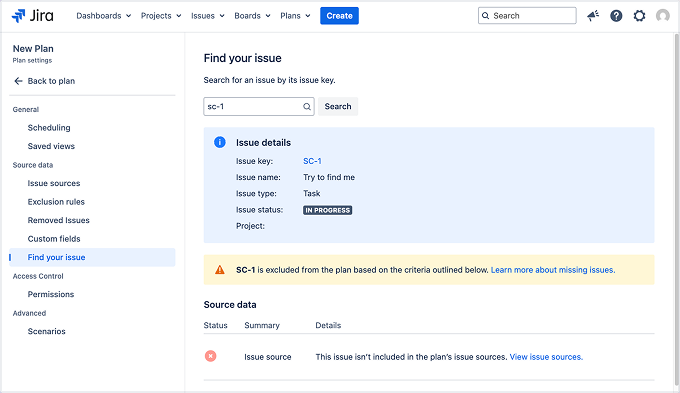
We’re introducing the Find your issue feature to help you quickly understand why a specific issue isn’t visible in your Advanced Roadmaps for Jira dashboard. You can search for any issue by its key, and Jira will analyze your dashboard’s filters and settings to explain why the issue is missing.
Diagnostics run in the background. Each request is handled separately, and rate limits help maintain consistent performance.
To find missing issues:
1. From the Roadmap tab, go to Settings, then Configure, then select Find your issues.
2. In the search box, enter the issue key and select Search.
More about missing issues in Advanced Roadmaps
Resolved issues
See the full list of the issues we’ve resolved throughout the lifecycle of Jira Software 11.1.

Add scopes to REST endpoints to use OAuth 2.0 2LO
We’ve introduced @ScopesAllowed to improve security and control over REST endpoints.
Add the @ScopesAllowed annotation to your endpoints to make them accessible using an OAuth 2.0 Client Credentials token (2LO).
For example, this annotation requires that the access token has the WRITE scope before providing access to this endpoint.
@POST
@ScopesAllowed(requiredScope = "WRITE")
public void createEntity(...) {}
Updated Tomcat protocols
We’re implementing several important changes to our OAuth 2.0 authentication process to enhance security and efficiency.
- Enforced global maximum time on access tokens: Access tokens will now have a maximum validity period of 1 hour. This change is designed to improve security by ensuring tokens are refreshed more frequently. You can change the value by setting the atlassian.oauth2.provider.access.token.expiration.seconds system property.
- Maximum lifetime of client ID and secret: The lifetime of client IDs and secrets is now 90 days by default. However, you can adjust this setting to a maximum of 730 days. This change aims to encourage regular rotation of credentials. You can change the value by setting the atlassian.oauth2.provider.client.credentials.expiration.seconds system property.
- Rotation of client credentials: We recommend regularly rotating your client credentials, including both the client ID and secret, to improve security. Setting up a rotation policy helps reduce the risk if credentials are ever compromised.
- Revocation of rotated client credentials: Once client credentials (client ID and secret) are rotated, the previous credentials can be revoked. This ensures that only the most recent credentials remain active, reducing the risk of unauthorized access.
- Revocation of user’s refresh tokens: We now provide the ability to revoke all refresh tokens associated with a specific user. Additionally, administrators have the authority to revoke all refresh tokens for users within the system. This capability allows for greater control over session management and security.
- Maximum number of refresh tokens: The maximum number of refresh tokens allowed per client ID and user is limited to 25. This limitation helps manage resource usage and ensures that token proliferation is kept in check. You can change the value by setting the atlassian.oauth2.provider.refresh.token.limit.per.client.user system property.
The APR/Native library and the APR/Native Connectors, including both AJP and HTTP, are deprecated in Tomcat 10 and will be removed starting from Tomcat 10.1.x. Specifically, the Http11AprProtocol (HTTP connector) and the AjpAprProtocol (AJP connector) are deprecated.
Consequently, com.atlassian.secrets.tomcat.protocol.AjpAprProtocolWithPasswordEncryption and com.atlassian.secrets.tomcat.protocol.Http11AprProtocolWithPasswordEncryption are no longer supported in Jira 11.