
Gatum Release Notes 9.9.0 20.04.26
?Date: 20.04.2026
?Version: 9.9.0
?Summary
This release improves database management and phone number validation across
the Client Cabinet, adds profile time zone management, and fixes issues in login,
sign-up, SMPP credentials, sub accounts, SMS data, and admin UI
responsiveness.
Client Cabinet (New)
?New Features
Profile time zone management
Change: Users can now edit their time zone in profile settings. The selected time zone is also shown in the header when there is enough space.
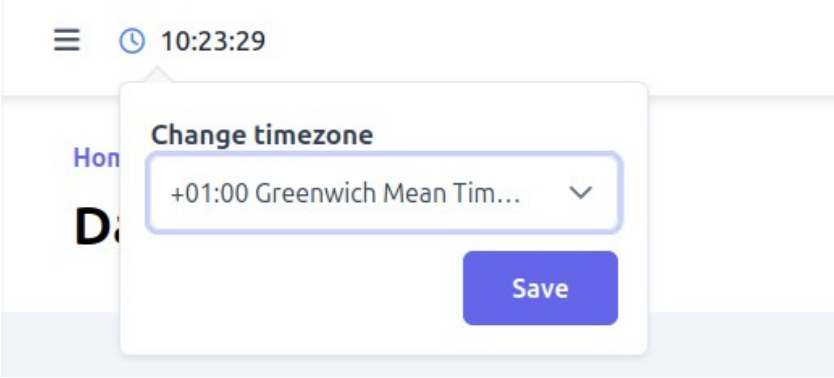
Value: Makes account settings easier to manage and helps users quickly confirm the active time zone.
?Improvements
Databases left menu block improvements
Change: Improved database management across the left menu, upload flow, and table view. Bulk actions now appear only after at least one record is selected, similar to the SMS Scheduled page, and separate action buttons were removed from filters panel. Added filters by Phone, Name, and Congratulate on birthday, and restored Copy numbers and Move numbers actions at the bottom. On the Upload numbers page, users can now add numbers either from the Numbers list or from a file via Choose/Load, while the non-selected option is disabled. Phone number input is now limited to digits only, with a length of 7 to 16 digits. On the View database page, row actions are fixed in place, so they remain visible without horizontal scrolling.
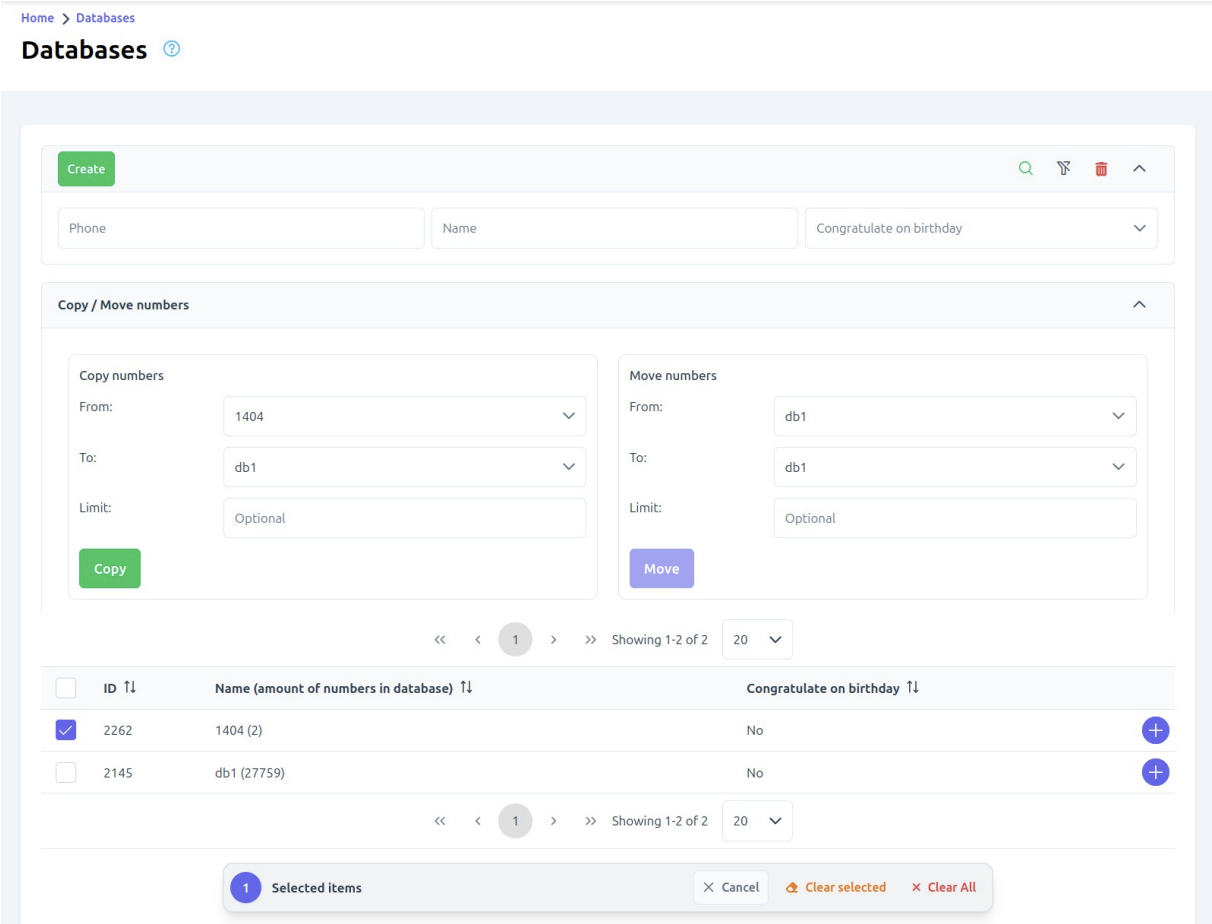
Value: Makes database management cleaner, faster, and easier by reducing visual clutter, preventing input errors, and improving access to key actions.
SMS full data status placement
Change: Moved the Status column to appear between Sent time and DLR time in SMS Full data.
Value: Improves readability and makes delivery details easier to review.
Phone number validation alignment
Change: Standardized phone number validation across the platform to allow digits only, with a length of 7 to 16 digits. Updated the rules on the Registration page, in Blacklist for both single entry and bulk upload, and in Sub account forms. Also aligned related validation and informational messages with the new rule.
Value: Creates a more consistent user experience, makes input requirements clearer, and reduces validation errors.
Sub account creation confirmation
Change: Added a success message after a sub account is created.
Value: Gives users clear feedback that the action was completed successfully.
Manage access label in Sub accounts section
Change: Renamed the Access button to Manage access.
Value: Makes the action clearer and easier to understand.
?Bug Fixes
WhatsApp template header type display
Change: Fixed an issue where an empty header type could also appear as “None,” causing duplicate display states.
Value: Makes template settings clearer and avoids confusion.
Remember me login option
Change: Fixed the Remember me checkbox on the login page so it now works as expected.
Value: Helps users stay signed in more reliably.
SMPP password trailing slash
Change: Fixed an issue where an extra slash was added when creating or editing SMPP
credentials if the password ended with a digit.
Value: Prevents credential corruption and reduces connection issues.
SMPP unchanged credentials save state
Change: Fixed an issue where saving SMPP credentials without changes could show a “Such smpp account already exists” error. The Save button is now inactive when no changes are made.
Value: Prevents misleading validation errors and makes form behavior clearer.
Repeat message content
Change: Fixed an issue where the Repeat action on the Compose page did not copy the SMS text from a sent campaign.
Value: Makes it faster to reuse previous campaigns.
Sub account phone input validation
Change: Fixed an issue where alphabetic characters and special symbols could be entered in the Sub account phone field without validation errors.
Value: Prevents invalid input and improves data quality.
SMS full data duplicate records
Change: Fixed an issue where an SMS split into multiple parts could appear as duplicate records in SMS Full data.
Value: Keeps reporting accurate and easier to review.
Sub account name validation
Change: Fixed an issue where the Name field in Sub account creation did not show a
validation error in a specific scenario.
Value: Makes form validation more reliable.
Sign-up flow stability
Change: Fixed an issue affecting the sign-up flow.
Value: Improves registration stability.
Admin Platform (Old)
?Bug Fixes
Pool creation form alignment
Change: Fixed layout issues on the Create a Pool page across different screen sizes and
browser scales. The Percentage label, required mark, and fields now stay aligned correctly.
Value: Improves form readability and usability on smaller screens.